The appeal of futuristic watch faces
A smartwatch is the closest thing most of us have to a piece of sci-fi technology. While classic analog dials have their place, many users want a face that reflects the advanced tech inside the device. Futuristic designs often use high-contrast neon colors, data-heavy layouts, or minimalist geometry that makes a Galaxy Watch or Pixel Watch feel like it belongs in a cyberpunk setting.
When searching for these designs, you are usually looking for a few specific elements:
- Data density: Lots of complications like heart rate, battery life, and step counts shown in technical fonts.
- Animation: Moving gears, pulse waves, or scanning radar effects.
- Vibrant color palettes: Electric blues, neon greens, and deep purples against a true black background.
- Unique layouts: Non-traditional ways of showing time, such as vertical bars or rotating discs.
How to find futuristic watch faces for Wear OS
Finding the right design in the massive Google Play Store can be difficult because search results are often cluttered with generic designs. Instead of wide searches, follow these steps to find high-quality futuristic dials:
- Use Curated Catalog Apps: Apps like Watchland organize more than 1,000 faces into specific collections. This allows you to skip the generic designs and go straight to the 'Digital Dreams' or 'Futuristic' categories.
- Filter by Style: Look for keywords like 'Tactical', 'Cyber', 'Neon', or 'Terminal'. These usually yield much better results than searching for 'digital watch face'.
- Check for Watch Face Format (WFF): This is the modern standard for Wear OS. Faces built this way are rendered by the watch system itself, which saves battery and ensures the animations stay smooth even on older hardware.
Top futuristic styles to try
If you aren't sure where to start, here are three popular sub-genres of futuristic design available in the Watchland catalog:
Tactical and Radar Styles
These faces mimic military equipment or cockpit displays. They often feature a circular 'scanning' animation and green or amber text. Dials like Tactical Radar are perfect examples of this look, providing a tool-like aesthetic that feels functional and rugged.
Cyberpunk and Neon
Inspired by futuristic cityscapes, these faces use glowing edges and high-contrast digital digits. They look particularly striking on the OLED screens of the Galaxy Watch and Pixel Watch because the deep blacks allow the neon colors to 'pop'. Look for designs like Neon Logic or Vaporwave Horizon for this vibe.
System Terminals
For a retro-future look, terminal-style faces mimic old computer code or command-line interfaces. These are usually minimalist, using monospaced fonts and simple layouts. The System Terminal face is a great choice if you want your wrist to look like a hacker's workstation.
Customizing your high-tech look
Finding the face is only the first step. To make a futuristic design truly useful, you should take advantage of Wear OS complications. Most high-tech faces allow you to swap out data points to match your needs.
For a truly 'connected' feel, try setting your complications to show:
- Weather conditions: Often shown with technical icons.
- Sensor data: Real-time heart rate or step progress bars.
- Battery levels: A classic staple of any high-tech display.
In the Watchland app, many of these futuristic designs support Always-on Mode. This means the design stays visible in a dimmed, battery-friendly state even when you aren't looking directly at your watch.
Coming soon: AI-generated futuristic faces
If you can't find the exact sci-fi look you want, a new way to create them is on the horizon. Watchland is currently developing an AI Face Creator, which is currently in a closed beta for Premium members.
Soon, you will be able to describe a face in your own words—for example, 'a glowing blue reactor with rotating gears and digital time'—and the AI will generate four unique designs for you. You can then tweak individual parts, like the hands or the font, to get the perfect futuristic look. This feature is currently in internal testing and will be rolling out to the public in the future.
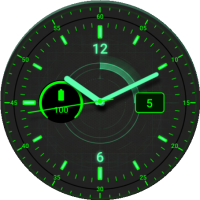 Tactical Radar
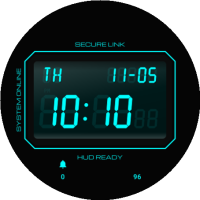 System Terminal
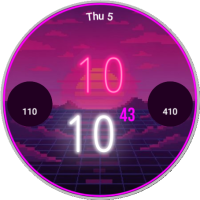 Vaporwave Horizon
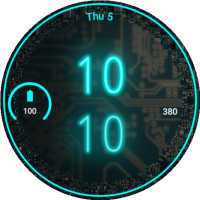 Neon Logic
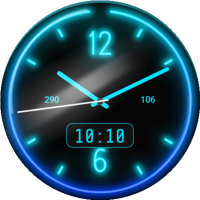 Blue Tube Neon
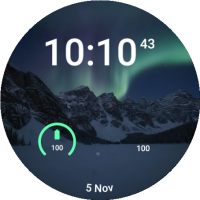 Aurora Peak